nvk_CREATE
Build layered sounds from a sound library in Reaper
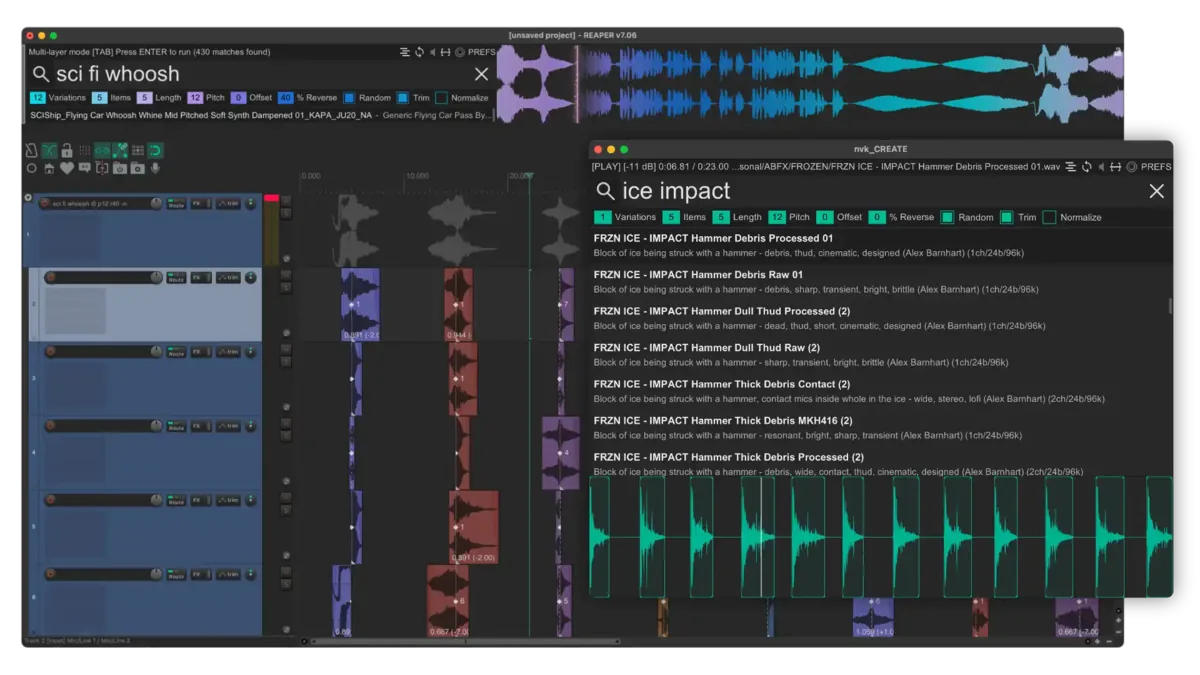
The script searches Media Explorer databases while typing. In multi-layer mode, Enter builds layered variations from the results, trimmed to takes and lined up on their peaks, as editable items.
Purchases go through Gumroad.com
- 14-day trial, no card needed
- Includes nvk_CREATE - Replace
- macOS & Windows, Reaper 7+
- Multi-user licenses available
How it works
-
Search
Open the script and type. Press Enter or drag a result to insert it.
-
Set up the layers
Press Tab for multi-layer mode. Set Variations, Items, and Length, and how much Pitch, Offset, and % Reverse to randomize.
-
Press Enter
The script builds the variations in the project, ready to edit and render.
Features
Live search
Searches several Media Explorer databases at once, with results updating on each keystroke and no box to click. Shift+Space previews the selected file.
Multi-layer mode
Set how many variations to build and how many layers each has. They come in as editable items.
Auto-trim
Items come in trimmed to their first take, with take markers on each take's first peak and a snap offset at the first one, ready for nvk_TAKES.
Randomized layers
Pitch, Offset, and % Reverse vary each layer. Random picks a different take from each file, and Trim lines the layers up on their peaks.
Waveform view
Click the waveform to seek while a file plays, or drag from it to bring one take into the project.
Replace from the track name
nvk_CREATE - Replace swaps the selected items for new matches. On a track named
ice crunch l6 p12 r50, it brings in 6-second layers with 12 semitones of random pitch, about half of them reversed.
Multi-layer settings
These appear under the search after pressing Tab.
- Variations
- How many variations to build.
- Items
- How many items (layers) each variation has.
- Length
- Item length. The script looks for takes that fit before randomizing pitch.
- Pitch
- Random pitch per item, in semitones.
- Offset
- Random position offset per item, in seconds.
- % Reverse
- Share of items reversed at random.
- Random
- With Trim on, each item is trimmed to a random take. With it off, each item gets a random take offset.
- Trim
- Analyzes the files to trim items to takes that fit the Length and line them up on their RMS peaks. With it off, files are cut to length.
- Normalize
- Normalizes the items after they're added.
Search syntax
A number followed by a letter filters by the file itself.
"wild horse" OR mustang NOT vehicleQuotes, OR, and NOT"wild horse",mustang -vehicleThe same search, with a comma for OR and a hyphen for NOTgrowl 48k+Files matching growl at 48 kHz or above
| Token | Filters by | Examples |
|---|---|---|
b | Bit depth | 32b, 16b+, 24b- |
ch | Channels | 1ch, 6ch+, 2ch- |
k | Sample rate (kHz) | 192k, 48k+, 22k- |
s | File length (seconds) | 5s, 1s+, 40s= |
t | Take length (seconds) | 5t, 1t+, 0.5t- |
+ means at or above, - at or below, and = an exact match. Take length needs the file cache, which F5 builds.
nvk_RECORD
nvk_RECORD keeps the last 20 seconds of Reaper's output. To turn it on, dock the script and click the waveform view with no items selected. Right-drag over a recent sound and drag it into the project.

FAQ
Can I try it before buying?
Yes, for 14 days, no card needed. Install it with the install guide, run it in Reaper, and leave the license field blank when it asks.
What does it search?
Media Explorer databases set up in Reaper. Create one in the Media Explorer, add the folders that hold the sounds, and pick it in the script.
Which versions of Reaper and which systems are supported?
Reaper 7 or later on macOS and Windows.
What do I need before installing?
Reaper, ReaPack, the SWS/S&M Extension, ReaImGui, and the js_ReaScript API. The scripts install through ReaPack, and the install guide covers each step.
Can I use my license on more than one computer?
Yes. Each license works on up to four computers at a time, all used by the same person.
Can I buy licenses for a team?
Yes. Pick the number of people in the team license option at the bottom of this page for one multi-user key. Questions? Email support@nvk.tools.
nvk_CREATE
Includes nvk_CREATE - Replace and updates through ReaPack. Try it free for 14 days.
Purchases go through Gumroad.com
Buying for a team? Choose how many people need it for one multi-user key. Each person can use it on up to four of their own computers. Regular price $149, now $149 per license.
The Sound Design Bundle includes nvk_CREATE and nvk_AUTODOPPLER 2 for less than buying them separately.
See the bundle