nvk_SHARED
About
nvk_SHARED is the library every other nvk.tools script depends on. It isn't sold separately and you don't run it on its own: the installer adds it and keeps it up to date with everything else. If you use ReaPack, install it alongside your other nvk scripts and keep it updated whenever you update them. It also contains a couple of useful scripts to help manage your nvk.tools installation.
Running a window again
Starting with nvk_SHARED 5.1.0, compatible versions of nvk_API let single-instance windows handle repeat actions without REAPER’s running-script prompt. Running the action again brings the window forward, or closes it when Close on new instance is enabled. A window kept loaded by Persistent mode reopens in the same instance.
With an older or missing nvk_API, REAPER keeps its existing behavior. If it asks how to handle a running script, choose New instance and enable Remember my answer for this script. Scripts that support multiple independent instances keep their existing behavior.
nvk_SHARED - Startup Actions
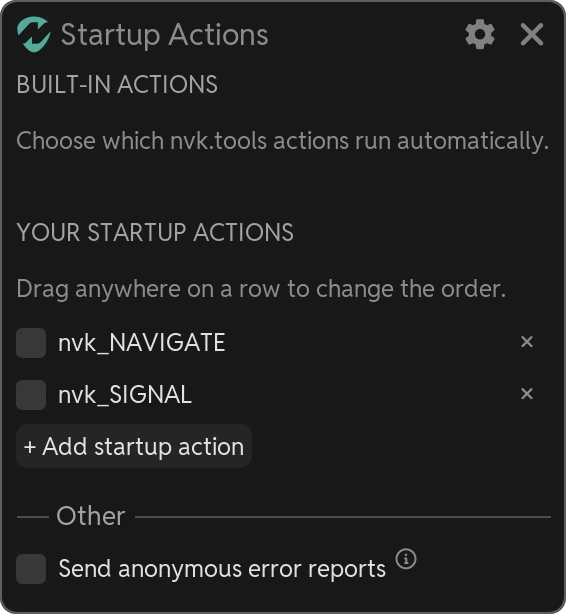
nvk_SHARED - Startup Actions is a script which allows you to easily add startup actions to be executed when Reaper starts. It's auto-populated with the common nvk.tools scripts you might want to run on start, but you can also add any action you want with the script. You can also use the action nvk_SHARED - Startup Actions - Run in order to run all the scripts manually if you want.
nvk_SHARED - License Manager
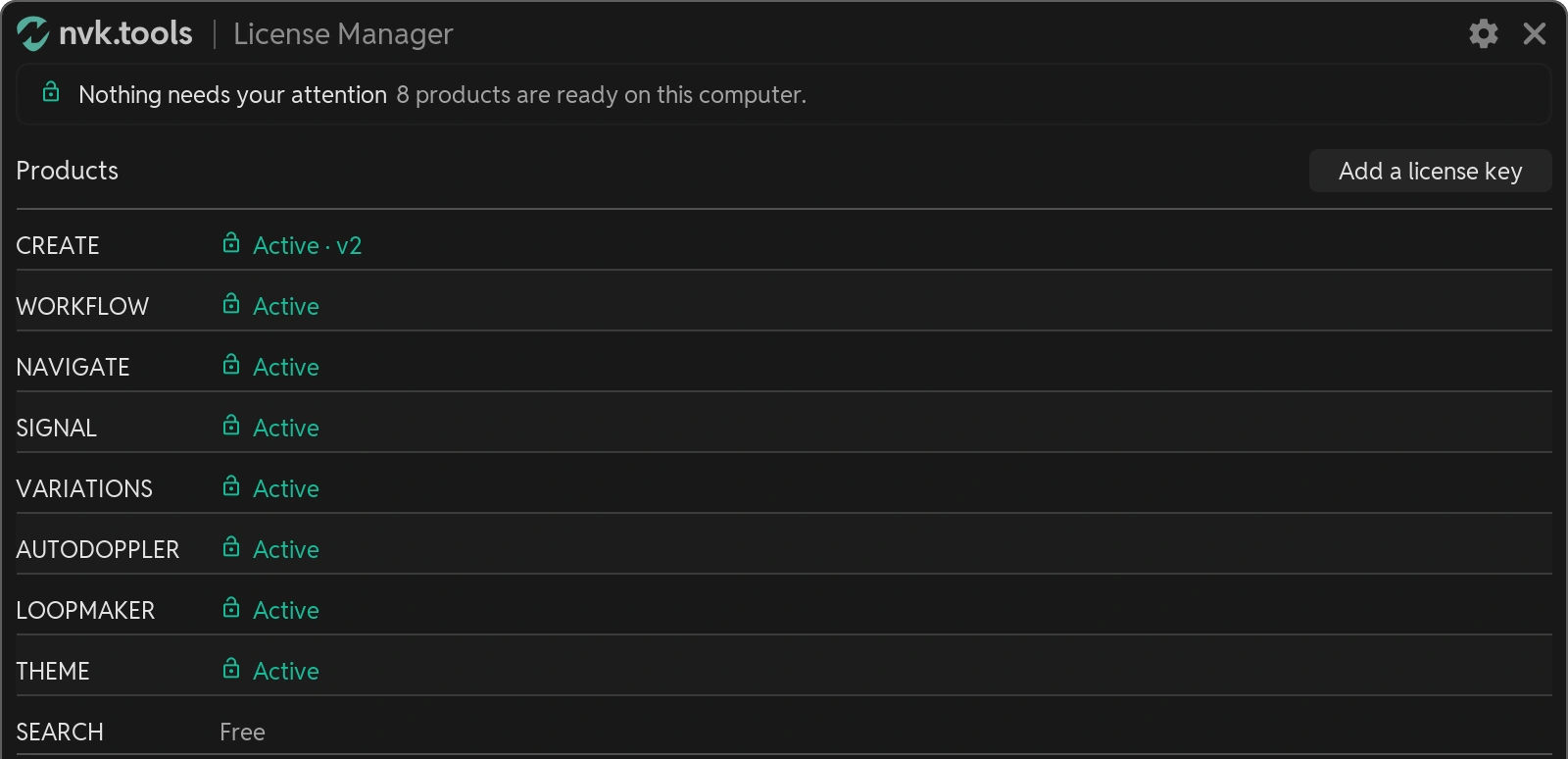
nvk_SHARED - License Manager is a script which allows you to easily manage your licenses for the nvk.tools suite. It shows which licenses you've activated, and remove your activation from a Reaper installation if desired.
Changelog
Show changelog
Note: Since nvk_SHARED primarily contains internal functions, this changelog only includes user-facing changes.
5.2.4
- Fix SMART take stepping across the ends of reversed sources.
- Stop LOOPMAKER from briefly changing item length and playrate while searching for zero crossings.
- Fix a crash in LOOPMAKER when an item's media is offline.
- Install script updates without restarting REAPER and show confirmation when an update finishes.
5.2.3
- Fix an update notice appearing after switching an up-to-date install to automatic updates.
- Open ReaPack directly to nvk_API after the startup dependency prompt and clarify installation and update instructions.
- Show the required nvk_API version and remind users to restart REAPER after updating it.
5.2.2
- Appearance and controls
- Search installed REAPER actions by name or command ID directly in Startup Actions and other action pickers.
- Support editing matching appearance settings and keyboard shortcuts directly in Preferences search.
- Add Light and Dark themes and accent presets in Preferences, with an option to give each script its own appearance.
- Combine theme and style editing in one Advanced window with Save and Cancel; remove the whole-theme color sliders.
- Add nvk_SANS and nvk_MONO fonts, searchable font previews, and global font and zoom settings.
- Refresh Preferences, toolbars, presets, selectors and color pickers, with improved readability at different sizes.
- Remove the animated Party Mode theme.
- Add custom waveform gradients, opacity and docked-theme brightness controls; move Waveform color into Preferences.
- Improve preset menus, confirm removal, and save edits to inactive presets.
- Add Reset all settings and Clear all user data, preserving saved presets and user work during a settings reset.
- Preserve theme and accent changes made in other scripts while appearance settings are open.
- Use the script background when Match REAPER when docked is off, unless a custom docked background is set.
- Windows and shortcuts
- Show which actions will lose a keyboard shortcut before reassigning it or restoring default bindings.
- Reopen single-instance windows without REAPER’s running-script prompt when a compatible nvk_API is installed.
- Improve docking, FX pickers, keyboard shortcuts, macOS shortcut labels and Startup Actions organization.
- Add Disable drag to dock in Preferences and let Tab and Shift+Tab move between number fields.
- Show full dropdown names and values on hover, keyboard focus outlines, and built-in shortcut restrictions.
- Keep long toolbar hover text readable and explain how to retry a failed FX screenshot capture.
- Keep screenshot menus stable while hovering over their controls.
- Fix trackpad scrolling stepping unevenly on controls and prevent controls from opening the empty-space context menu.
- Add a License section to paid scripts' Preferences and fix Open License Manager reporting that nvk_SHARED is missing.
- Reliability
- Keep overlapping child items in a folder selection when a later, shorter item ends before the folder.
- Fix take detection missing later sounds when REAPER returns only part of a waveform.
- Preserve existing files when copying audio fails and reduce memory used for large copies.
- Restore MCP tools and rendering when SWS and js_ReaScriptAPI are absent.
- Recognize a single-space item name as unnamed.
- Ignore Vordio video clips and captions that were previously tagged as folder items.
- Fix errors when scrolling dialogs.
- Save settings safely, recover after a failure, and keep presets and user data safe if a script closes during a settings reset.
- Fix settings saves on full disks and loading from network installations or Windows paths with non-English characters.
- Fix freezes in small or scrolled windows, delayed freezes after opening, and Windows scripts closing while still focused.
- Add optional anonymous error reporting and show complete errors in the console.
- Fix REAPER no longer redrawing after a script error during an edit.
- Improve performance with large item selections, highlighted search results and long font lists.
- Preserve curved fades and automatic crossfade curves in REAPER 7.82 and later.
- Fix take navigation with empty, reversed or looping items and different playback rates; preserve take markers during analysis.
- Preserve unrelated automation selections, take polarity and MIDI source lengths during item operations.
- Fix marker, region and envelope errors after undo or deletion; leave unrelated empty items on folder tracks alone.
- Scroll focused tracks below pinned tracks and fix render-stat weekday text on non-English systems.
- Updates and requirements
- Show when REAPER still needs to restart to load an installed update.
- Recommend the optional nvk_API extension once on supported ReaPack installations.
- Add automatic updates in Preferences, including beta versions, Check for updates and What's new after an update.
- Prompt once per session when installed packages need updating together, while keeping older scripts working.
- Improve update checks on older systems and behind firewalls or proxies, with explanations when a check fails.
- Order update versions as ReaPack does, including releases following beta versions.
- Support the nvk tools installer without ReaPack and move updated actions to their correct action-list section.
- Make SWS and js_ReaScriptAPI optional for supported functionality when nvk_API is installed.
- Requires ReaImGui 0.10.0.3 or newer.
4.4.1
- Error when trying to activate a license in the upgrade popup.
4.4.0
- Allow for disabling close if unfocused in command pallette mode.
- Fix for duplicated markers when undoing folder item duplication.
- Move region ends when moving markers with ripple in nvk_VARIATIONS.
4.3.0
- Improve behavior when nvk_SEARCH is set to always on top and a project is loaded with prompts in the same location as the script. Not completely fixed, recommend not using 'Always on Top' if possible.
4.2.0
- Minor visual improvements.
- Can now reset style sliders to default value with right-click.
4.0.0
- Support for new take detection behavior and scripts
- Codebase refactoring - make sure to update all your scripts to the latest version
- Various minor improvements and bug fixes
- Support for latest version of ReaImGui, font improvements
- Script unfocused color improvements, a little bit more clear when script does not have focus
3.7.0
- Support for new nvk_SEARCH features
3.6.3
- Font selection box not showing selected font name as selected in certain cases
3.6.0
- IMPORTANT: reverting behavior introduced in 3.4.2 to exclude tracks with excluded words from being added to folder items in parent tracks. If this behavior is desired, there is a new setting in "nvk_FOLDER_ITEMS - Settings" Track Filters which can be used to specify exactly which track names should be excluded from contributing to folder item size calcultation. Will need to update to nvk_FOLDER_ITEMS 2.13.2 to change the setting
3.5.2
- Fix for required words setting not working for folder items
3.5.1
- New option to force resizeable window as a workaround for undesired behavior with tiling window managers in Linux
3.5.0
- IMPORTANT: Removing support for Reaper 6. To use this script, you must upgrade to Reaper 7 or higher. Older versions can be downloaded from the full repository: https://raw.githubusercontent.com/nickvonkaenel/nvk-ReaScripts/main/index.xml
- New keyboard shortcuts to zoom, change font size, and center window over Reaper arrange in ReaImGui scripts
- Allow for custom theming of certain window colors based on docked state
- Take into account items on nested parent tracks when calculating folder item columns with top-level setting enabled
- License verification now notifies user when license key is for a different product
- Fix for error in random take function when the current take can't be found
3.4.2
- Exclude tracks with excluded words from being added to folder items in parent tracks
3.4.1
- Fix for update notifications showing when no updates are available
- Restore undocked window size when undocking script after reopening
- Optimization: ReaImGui scripts now use less cpu while running in the background.
3.4.0
- Docked windows not focused when opening new instance of a script
- Docked windows now have a different color scheme to blend in better with Reaper UI
- Persistent mode now disabled while scripts are docked since it doesn't work well with docked windows
- Restore undocked window size when undocking script
- Notify user when update is available
- Minor UI improvements
3.3.0
- Warn if adding FX to a large number of items/tracks at once
3.2.2
- Startup Actions:
- Allow for reordering user actions
- User actions start enabled by default when first added
- Explicity disable adding multiple actions with the same name (can use custom actions if you really need this)
3.2.1
- Improvements to behavior of automatic folder item creation on muted parent tracks. Now if a parent track is muted, named folder items will not be removed or updated. This is to avoid situations where named folder items were removed when muting groups of tracks all at once.
3.2.0
- Improved tab order icons
3.1.0
- Better fix for persistent mode. Make sure to select 'new instance' when prompted for the first time after running the script while it's already open.
- Fix for error on upgrade notification
2.9.3
- Change to set_action_options API in Reaper 7.32 caused scripts in persistent mode to not re-open after closing the script
2.9.2
- Error when opening Startup Actions without the full nvk.tools repository in the actions list
2.8.0
- More nvk_THEME features
- Improved performance of track color functions
2.6.3
- Tweaks to FX search UI
2.6.2
- Adding Startup Actions script - set up startup actions to run when Reaper starts
- Fixing error with takes on certain files (nil diff)
2.6.1
- Removing the last track in a folder could cause the folder structure to be incorrect
2.5.0
- License Manager - Manage activation and deactivation of script licenses
- Improved remove icons and added confirmation to preset removal
- Licensing improvements
2.4.0
- Moved FX search to shared library
2.3.0
- Fix bug with fade scripts and items with shared or overlapping edges
2.0.1
- Allow for subprojects to be used by Loopmaker and Variations.
2.0.0
- Fixed font paths for Reaper 6
1.9.0
- Updated to ReaImGui 0.9.2
1.7.0
- Custom fonts moved to global font folder so you don't have to copy them to a folder for each script. If you had custom fonts, you will need to move them to the new location. You can find the new location in the script settings under Fonts > Add more fonts...```
1.0.0
- Initial release